

AI Integration Quick Reference
AI Integration Quick Reference
{
  "category": "calling",
  "features": [
    {"name": "voiceCalling", "description": "One-on-one and group audio calls", "component": "CometChatCallButtons", "enabledByDefault": true},
    {"name": "videoCalling", "description": "One-on-one and group video calls", "component": "CometChatCallButtons", "enabledByDefault": true},
    {"name": "callLogs", "description": "View call history with metadata", "component": "CometChatCallLogs", "enabledByDefault": true},
    {"name": "incomingCall", "description": "Handle incoming call UI with accept/reject", "component": "CometChatIncomingCall", "enabledByDefault": true},
    {"name": "outgoingCall", "description": "Display outgoing call screen while connecting", "component": "CometChatOutgoingCall", "enabledByDefault": true},
    {"name": "ongoingCall", "description": "Active call interface with controls", "component": "CometChatOngoingCall", "enabledByDefault": true}
  ],
  "sdkDependencies": {
    "required": "CometChatCallsSDK 4.2.2",
    "permissions": ["NSCameraUsageDescription", "NSMicrophoneUsageDescription"]
  },
  "relatedComponents": ["CometChatCallButtons", "CometChatCallLogs", "CometChatIncomingCall", "CometChatOutgoingCall", "CometChatOngoingCall"]
}
Overview
Add one-on-one and group audio/video calling to your iOS app. Once integrated, call buttons automatically appear in chat headers, and incoming/outgoing call screens are handled for you.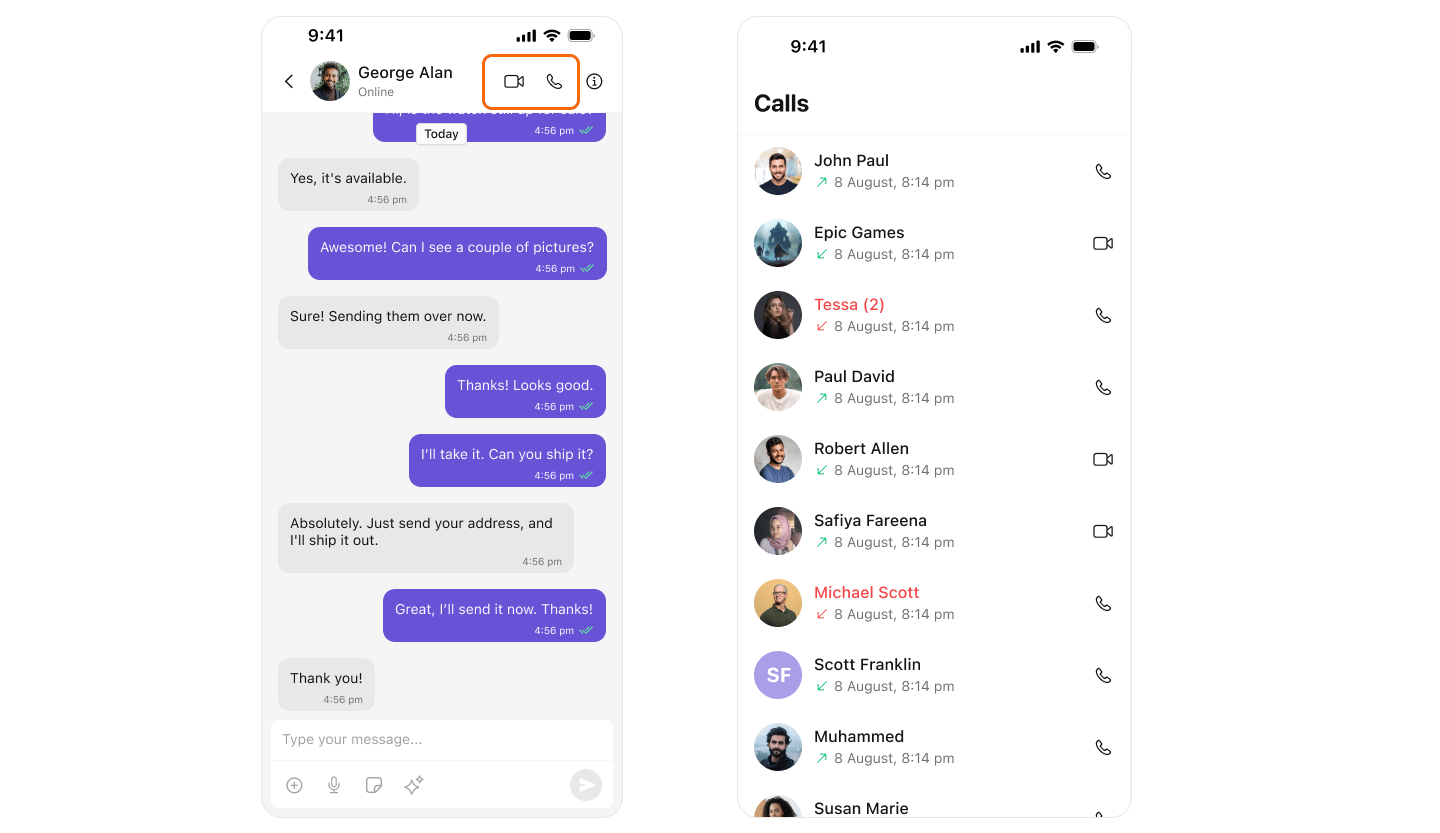
Quick Setup
Add Dependencies
Add to your Run:
Podfile:platform :ios, '13.0'
use_frameworks!
target 'YourApp' do
pod 'CometChatUIKitSwift', '5.1.9'
pod 'CometChatCallsSDK', '4.2.2'
end
pod install
Add Permissions
Add to
Info.plist:<key>NSCameraUsageDescription</key>
<string>Camera access required for video calls</string>
<key>NSMicrophoneUsageDescription</key>
<string>Microphone access required for voice and video calls</string>
Initialize CometChat
In
SceneDelegate.swift:import CometChatUIKitSwift
func scene(_ scene: UIScene, willConnectTo session: UISceneSession, options connectionOptions: UIScene.ConnectionOptions) {
guard let windowScene = (scene as? UIWindowScene) else { return }
let uikitSettings = UIKitSettings()
.set(appID: "YOUR_APP_ID")
.set(authKey: "YOUR_AUTH_KEY")
.set(region: "YOUR_REGION") // "us", "eu", or "in"
.build()
CometChatUIKit.init(uiKitSettings: uikitSettings) { result in
switch result {
case .success:
CometChatUIKit.login(uid: "cometchat-uid-1") { loginResult in
switch loginResult {
case .success:
// Calling is now enabled automatically
print("✅ Ready for calls")
case .onError(let error):
print("❌ Login failed: \(error.description)")
@unknown default:
break
}
}
case .failure(let error):
print("❌ Init failed: \(error.localizedDescription)")
}
}
}
CometChatMessages header automatically.
Production-Ready Implementation
Complete app with calling, chat, and call history:- SceneDelegate.swift
- MainTabBarController.swift
import UIKit
import CometChatUIKitSwift
import CometChatSDK

class SceneDelegate: UIResponder, UIWindowSceneDelegate {

    var window: UIWindow?

    func scene(_ scene: UIScene, willConnectTo session: UISceneSession, options connectionOptions: UIScene.ConnectionOptions) {
        guard let windowScene = (scene as? UIWindowScene) else { return }

        // Initialize CometChat
        let uikitSettings = UIKitSettings()
            .set(appID: "YOUR_APP_ID")
            .set(authKey: "YOUR_AUTH_KEY")
            .set(region: "YOUR_REGION")
            .subscribePresenceForAllUsers()
            .build()

        CometChatUIKit.init(uiKitSettings: uikitSettings) { [weak self] result in
            switch result {
            case .success:
                print("✅ CometChat initialized")
                self?.loginAndSetupUI(windowScene: windowScene)

            case .failure(let error):
                print("❌ Init failed: \(error.localizedDescription)")
            }
        }
    }

    private func loginAndSetupUI(windowScene: UIWindowScene) {
        CometChatUIKit.login(uid: "cometchat-uid-1") { [weak self] result in
            switch result {
            case .success:
                print("✅ Logged in")
                DispatchQueue.main.async {
                    self?.setupMainInterface(windowScene: windowScene)
                }

            case .onError(let error):
                print("❌ Login failed: \(error.description)")

            @unknown default:
                break
            }
        }
    }

    private func setupMainInterface(windowScene: UIWindowScene) {
        let tabBar = MainTabBarController()

        window = UIWindow(windowScene: windowScene)
        window?.rootViewController = tabBar
        window?.makeKeyAndVisible()
    }
}
import UIKit
import CometChatUIKitSwift

class MainTabBarController: UITabBarController {

    override func viewDidLoad() {
        super.viewDidLoad()
        setupTabs()
        setupAppearance()
    }

    private func setupTabs() {
        // Chats Tab - with calling enabled
        let chatsVC = CometChatConversationsWithMessages()
        let chatsNav = UINavigationController(rootViewController: chatsVC)
        chatsNav.tabBarItem = UITabBarItem(
            title: "Chats",
            image: UIImage(systemName: "message"),
            selectedImage: UIImage(systemName: "message.fill")
        )

        // Calls Tab - call history
        let callsVC = CometChatCallLogs()
        callsVC.set(onItemClick: { [weak self] callLog in
            self?.handleCallLogTap(callLog)
        })
        let callsNav = UINavigationController(rootViewController: callsVC)
        callsNav.tabBarItem = UITabBarItem(
            title: "Calls",
            image: UIImage(systemName: "phone"),
            selectedImage: UIImage(systemName: "phone.fill")
        )

        // Users Tab
        let usersVC = CometChatUsersWithMessages()
        let usersNav = UINavigationController(rootViewController: usersVC)
        usersNav.tabBarItem = UITabBarItem(
            title: "Users",
            image: UIImage(systemName: "person.2"),
            selectedImage: UIImage(systemName: "person.2.fill")
        )

        // Groups Tab
        let groupsVC = CometChatGroupsWithMessages()
        let groupsNav = UINavigationController(rootViewController: groupsVC)
        groupsNav.tabBarItem = UITabBarItem(
            title: "Groups",
            image: UIImage(systemName: "person.3"),
            selectedImage: UIImage(systemName: "person.3.fill")
        )

        viewControllers = [chatsNav, callsNav, usersNav, groupsNav]
    }

    private func setupAppearance() {
        tabBar.tintColor = .systemBlue
        tabBar.backgroundColor = .systemBackground
    }

    private func handleCallLogTap(_ callLog: CallLog) {
        // Get the other user from call log
        let loggedInUser = CometChat.getLoggedInUser()
        var otherUserUID: String?

        if let initiator = callLog.initiator as? CallUser,
           initiator.uid != loggedInUser?.uid {
            otherUserUID = initiator.uid
        } else if let receiver = callLog.receiver as? CallUser {
            otherUserUID = receiver.uid
        }

        guard let uid = otherUserUID else { return }

        // Fetch user and open chat
        CometChat.getUser(UID: uid) { [weak self] user in
            DispatchQueue.main.async {
                let messagesVC = CometChatMessages()
                messagesVC.user = user

                if let nav = self?.selectedViewController as? UINavigationController {
                    nav.pushViewController(messagesVC, animated: true)
                }
            }
        } onError: { error in
            print("Error: \(error?.errorDescription ?? "")")
        }
    }
}
Initiate Calls Programmatically
Voice Call to User
- Swift
import CometChatSDK

func startVoiceCall(to userUID: String) {
    let call = CometChat.Call(
        receiverId: userUID,
        callType: .audio,
        receiverType: .user
    )

    CometChat.initiateCall(call: call) { call in
        print("✅ Voice call started: \(call?.sessionId ?? "")")
    } onError: { error in
        print("❌ Call failed: \(error?.errorDescription ?? "")")
    }
}

// Usage
startVoiceCall(to: "cometchat-uid-2")
Video Call to User
- Swift
import CometChatSDK

func startVideoCall(to userUID: String) {
    let call = CometChat.Call(
        receiverId: userUID,
        callType: .video,
        receiverType: .user
    )

    CometChat.initiateCall(call: call) { call in
        print("✅ Video call started: \(call?.sessionId ?? "")")
    } onError: { error in
        print("❌ Call failed: \(error?.errorDescription ?? "")")
    }
}

// Usage
startVideoCall(to: "cometchat-uid-2")
Group Call
- Swift
import CometChatSDK

func startGroupCall(to groupGUID: String, type: CometChat.CallType) {
    let call = CometChat.Call(
        receiverId: groupGUID,
        callType: type,
        receiverType: .group
    )

    CometChat.initiateCall(call: call) { call in
        print("✅ Group call started: \(call?.sessionId ?? "")")
    } onError: { error in
        print("❌ Call failed: \(error?.errorDescription ?? "")")
    }
}

// Usage
startGroupCall(to: "group-guid", type: .video)
Custom Call Buttons
Add call buttons anywhere in your app:- Swift
import UIKit
import CometChatUIKitSwift
import CometChatSDK

class UserProfileViewController: UIViewController {

    var user: CometChat.User!

    private let voiceCallButton: UIButton = {
        let button = UIButton(type: .system)
        button.setImage(UIImage(systemName: "phone.fill"), for: .normal)
        button.setTitle(" Voice Call", for: .normal)
        button.backgroundColor = .systemGreen
        button.tintColor = .white
        button.layer.cornerRadius = 12
        button.translatesAutoresizingMaskIntoConstraints = false
        return button
    }()

    private let videoCallButton: UIButton = {
        let button = UIButton(type: .system)
        button.setImage(UIImage(systemName: "video.fill"), for: .normal)
        button.setTitle(" Video Call", for: .normal)
        button.backgroundColor = .systemBlue
        button.tintColor = .white
        button.layer.cornerRadius = 12
        button.translatesAutoresizingMaskIntoConstraints = false
        return button
    }()

    override func viewDidLoad() {
        super.viewDidLoad()
        setupUI()
    }

    private func setupUI() {
        view.backgroundColor = .systemBackground

        let stackView = UIStackView(arrangedSubviews: [voiceCallButton, videoCallButton])
        stackView.axis = .horizontal
        stackView.spacing = 16
        stackView.distribution = .fillEqually
        stackView.translatesAutoresizingMaskIntoConstraints = false

        view.addSubview(stackView)

        NSLayoutConstraint.activate([
            stackView.centerXAnchor.constraint(equalTo: view.centerXAnchor),
            stackView.centerYAnchor.constraint(equalTo: view.centerYAnchor),
            stackView.leadingAnchor.constraint(equalTo: view.leadingAnchor, constant: 32),
            stackView.trailingAnchor.constraint(equalTo: view.trailingAnchor, constant: -32),

            voiceCallButton.heightAnchor.constraint(equalToConstant: 50),
            videoCallButton.heightAnchor.constraint(equalToConstant: 50)
        ])

        voiceCallButton.addTarget(self, action: #selector(voiceCallTapped), for: .touchUpInside)
        videoCallButton.addTarget(self, action: #selector(videoCallTapped), for: .touchUpInside)
    }

    @objc private func voiceCallTapped() {
        initiateCall(type: .audio)
    }

    @objc private func videoCallTapped() {
        initiateCall(type: .video)
    }

    private func initiateCall(type: CometChat.CallType) {
        guard let uid = user.uid else { return }

        let call = CometChat.Call(
            receiverId: uid,
            callType: type,
            receiverType: .user
        )

        CometChat.initiateCall(call: call) { [weak self] call in
            print("✅ Call initiated")
        } onError: { [weak self] error in
            self?.showError(error?.errorDescription ?? "Call failed")
        }
    }

    private func showError(_ message: String) {
        let alert = UIAlertController(title: "Error", message: message, preferredStyle: .alert)
        alert.addAction(UIAlertAction(title: "OK", style: .default))
        present(alert, animated: true)
    }
}
Using CometChatCallButtons Component
The built-in call buttons component:- Swift
import UIKit
import CometChatUIKitSwift
import CometChatSDK

class ChatHeaderViewController: UIViewController {

    var user: CometChat.User!

    override func viewDidLoad() {
        super.viewDidLoad()
        setupCallButtons()
    }

    private func setupCallButtons() {
        let callButtons = CometChatCallButtons()
        callButtons.user = user

        // Customize actions
        callButtons.set(onVoiceCallClick: { user, group in
            print("Voice call to: \(user?.name ?? group?.name ?? "")")
        })

        callButtons.set(onVideoCallClick: { user, group in
            print("Video call to: \(user?.name ?? group?.name ?? "")")
        })

        callButtons.set(onError: { error in
            print("Error: \(error.errorDescription)")
        })

        // Add to navigation bar
        let hostingController = UIHostingController(rootView: callButtons)
        addChild(hostingController)

        navigationItem.rightBarButtonItem = UIBarButtonItem(customView: hostingController.view)
    }
}
Handle Incoming Calls
Incoming calls are handled automatically. For custom handling:- Swift
import CometChatSDK

class CallHandler: NSObject, CometChatCallDelegate {

    static let shared = CallHandler()

    func registerForCalls() {
        CometChat.calldelegate = self
    }

    // Called when receiving an incoming call
    func onIncomingCallReceived(incomingCall: CometChat.Call?, error: CometChat.CometChatException?) {
        guard let call = incomingCall else { return }

        print("📞 Incoming call from: \(call.sender?.name ?? "")")
        print("Call type: \(call.callType == .audio ? "Audio" : "Video")")

        // The UI Kit automatically shows the incoming call screen
        // Add custom logic here if needed
    }

    // Called when an outgoing call is accepted
    func onOutgoingCallAccepted(acceptedCall: CometChat.Call?, error: CometChat.CometChatException?) {
        guard let call = acceptedCall else { return }
        print("✅ Call accepted: \(call.sessionId ?? "")")
    }

    // Called when an outgoing call is rejected
    func onOutgoingCallRejected(rejectedCall: CometChat.Call?, error: CometChat.CometChatException?) {
        guard let call = rejectedCall else { return }
        print("❌ Call rejected: \(call.sessionId ?? "")")
    }

    // Called when an incoming call is cancelled
    func onIncomingCallCancelled(canceledCall: CometChat.Call?, error: CometChat.CometChatException?) {
        guard let call = canceledCall else { return }
        print("📵 Call cancelled: \(call.sessionId ?? "")")
    }

    // Called when a call ends
    func onCallEnded(endedCall: CometChat.Call?, error: CometChat.CometChatException?) {
        guard let call = endedCall else { return }
        print("📴 Call ended: \(call.sessionId ?? "")")
    }
}

// Register in AppDelegate or SceneDelegate
// CallHandler.shared.registerForCalls()
Calling Components Reference
CometChatCallButtons
Renders voice and video call buttons.let callButtons = CometChatCallButtons()
callButtons.user = user // or callButtons.group = group
// Callbacks
callButtons.set(onVoiceCallClick: { user, group in })
callButtons.set(onVideoCallClick: { user, group in })
callButtons.set(onError: { error in })
CometChatIncomingCall
Displays incoming call screen with accept/reject options.let incomingCall = CometChatIncomingCall()
incomingCall.set(call: call)
incomingCall.set(onAcceptClick: { call in })
incomingCall.set(onDeclineClick: { call in })
CometChatOutgoingCall
Displays outgoing call screen while waiting for answer.let outgoingCall = CometChatOutgoingCall()
outgoingCall.set(call: call)
outgoingCall.set(onCancelClick: { call in })
CometChatCallLogs
Displays call history. See Call Logs for full documentation.let callLogs = CometChatCallLogs()
callLogs.set(onItemClick: { callLog in })
Related
- Call Logs - Display call history
- Call Buttons - Call button component
- Incoming Call - Incoming call screen
- Outgoing Call - Outgoing call screen
- Ongoing Call - Active call screen