

- Admin sets defaults and override rules in the dashboard.
- Users inherit those defaults until they change a setting the admin allows.
CometChatNotifications.fetchPreferences()returns the current merged view.CometChatNotifications.updatePreferences()saves allowed changes and returns the updated snapshot.
CometChatNotifications.fetchPreferences()/updatePreferences()CometChatNotifications.getMutedConversations()/muteConversations()/unmuteConversations()CometChatNotifications.resetPreferences()to restore dashboard defaults
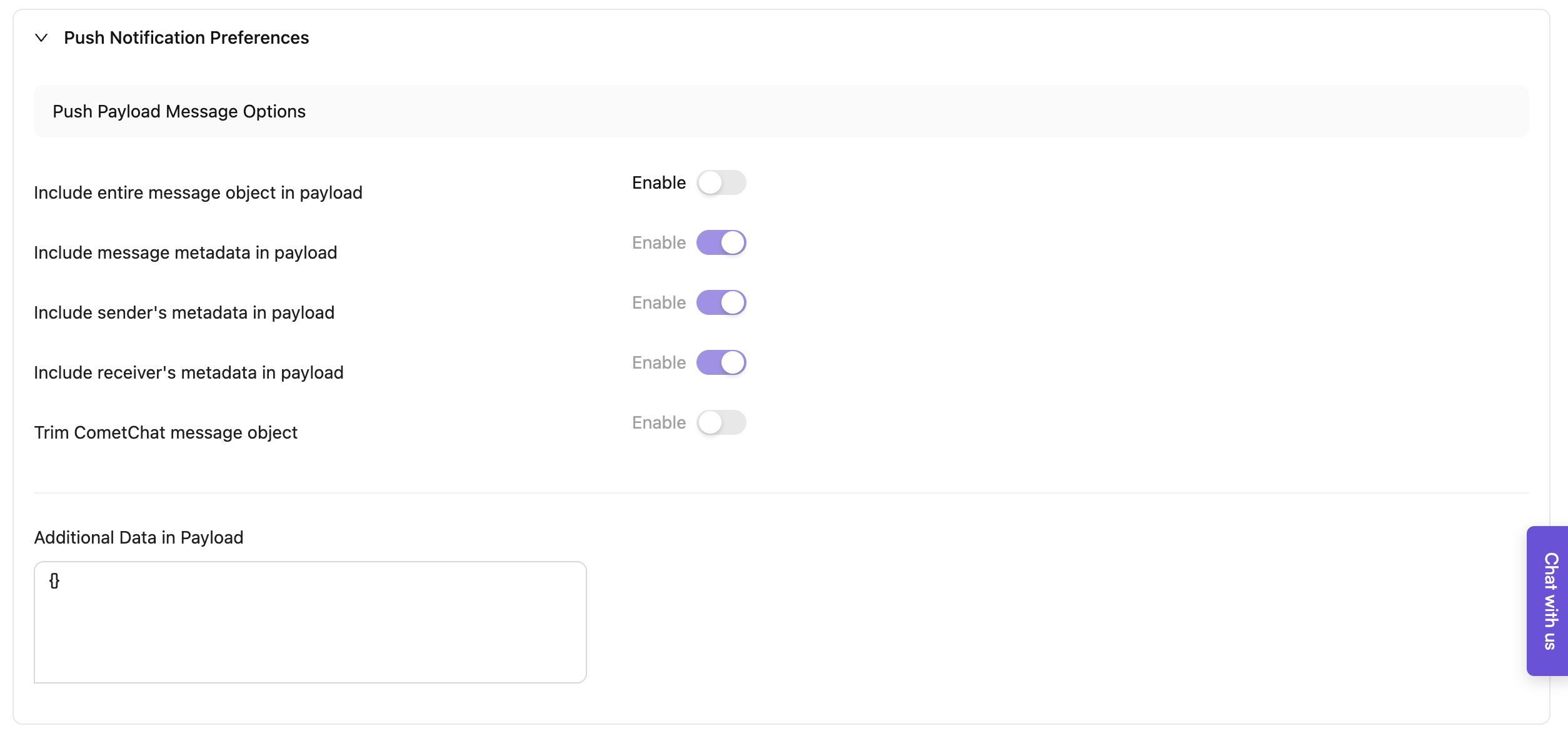
Push payload message options
These control what CometChat includes in push payloads. All are optional toggles:- Include entire message object in payload (largest footprint)
- Include message metadata in payload
- Include sender’s metadata in payload
- Include receiver’s metadata in payload
- Trim CometChat message object (strip down to stay within provider limits)
- Include badge count in payload (Premium feature - adds
unreadMessageCountfield with total unread messages for the user) - Additional data in payload (JSON you add)
Group preferences
Dashboard configuration
As the name suggests, these preferences help you to configure Notifications for events generated in group conversations.Regarding Message edited & Message deleted eventsPush notifications should be triggered for the message edited and message deleted events in order to retract the notification displaying the original message. Turning them off is not recommended.
Client-side implementation
The fetch/update pattern shown here applies to group, one-on-one, mute, and schedule preferences; only the preference classes change. 1. Fetch group preferencesCometChatNotifications.fetchPreferences() method retrieves the notification preferences as an instance of NotificationPreferences class. If the user has not configured any preferences, the default preferences defined by the CometChat administrator via the dashboard will be returned.
- JavaScript
- Android
- iOS
- Flutter
CometChatNotifications.updatePreferences() method is used to update a user’s notification preferences. The “override” toggle defined in the dashboard is crucial when updating preferences. If any preference is non-overridable, the method doesn’t generate an error; it instead returns the NotificationPreferences object with the updated values where overrides are allowed.
Use this sparingly, only when you must temporarily override preferences for a critical event, so users are not surprised by unexpected notification changes.
It is unnecessary to specify all values; only set and save the preferences that have been changed.
Since the user is performing this action, enums have values as
SUBSCRIBE or DONT_SUBSCRIBE. It is equivalent to “Notify” and “Don’t notify” respectively, from the dashboard preferences.- JavaScript
- Android
- iOS
- Flutter
One-on-one preferences
Dashboard configuration
As the name suggests, these preferences help you to configure Notifications for events generated in one-on-one conversations.Regarding Message edited & Message deleted eventsPush notifications should be triggered for the message edited and message deleted events in order to retract the notification displaying the original message. Turning them off is not recommended.
Client-side implementation
CometChatNotifications.fetchPreferences() method retrieves the notification preferences saved by the user as an instance of NotificationPreferences class. If the user has not configured any preferences, the default preferences defined by the CometChat administrator via the dashboard will be returned.
1. Fetch one-on-one preferences
- JavaScript
- Android
- iOS
- Flutter
CometChatNotifications.updatePreferences() method is used to update a user’s notification preferences. The “override” toggle defined in the dashboard is crucial when updating preferences. If any preference is non-overridable, the method doesn’t generate an error; it instead returns the NotificationPreferences object with the updated values where overrides are allowed.
Use this sparingly, only when you must temporarily override preferences for a critical event, so users are not surprised by unexpected notification changes.
It is unnecessary to specify all values; only set and save the preferences that have been changed.
- JavaScript
- Android
- iOS
- Flutter
Mute preferences
Dashboard configuration
These preferences control whether end users can change mute settings in the client.Client-side implementation
1. Fetch mute preferencesCometChatNotifications.fetchPreferences() method retrieves the notification preferences saved by the user as an instance of NotificationPreferences class. If the user has not configured any preferences, the default preferences defined by the CometChat administrator via the dashboard will be utilized.
You can use the CometChatNotifications.getMutedConversations() method to display a list of conversations that have been muted by users. The method will return an array of MutedConversations object.
- JavaScript
- Android
- iOS
- Flutter
CometChatNotifications.updatePreferences() method is used to update a user’s notification preferences. The “override” toggle defined in the dashboard is crucial when updating preferences. If any preference is non-overridable, the method doesn’t generate an error; it instead returns the NotificationPreferences object with the updated values where overrides are allowed.
Use this sparingly, only when you must temporarily override preferences for a critical event, so users are not surprised by unexpected notification changes.
It is unnecessary to specify all values; only set and save the preferences that have been changed.
To mute one or more group or one-on-one conversations, utilize the CometChatNotifications.muteConversations() method. This method requires an array of MutedConversation objects, each containing the following properties:
To unmute one or more group or one-on-one conversations that were muted by the user, utilize the
CometChatNotifications.unmuteConversations() method. This method requires an array of UnmutedConversation objects, each containing the following properties:
- JavaScript
- Android
- iOS
- Flutter
Notification schedule
Dashboard configuration
Notifications will be delivered based on the specified daily timetable, adhering to the user’s local time zone. Select “None” to disable Notifications for that day. For instance, this can be applied to weekends, such as Saturday and Sunday.Client-side implementation
1. Fetch schedule preferencesCometChatNotifications.fetchPreferences() method retrieves the notification preferences saved by the user as an instance of NotificationPreferences class. If the user has not configured any preferences, the default preferences defined by the CometChat administrator via the dashboard will be utilized.
- JavaScript
- Android
- iOS
- Flutter
CometChatNotifications.updatePreferences() method is used to update a user’s notification preferences. The “override” toggle defined in the dashboard is crucial when updating preferences. If any preference is non-overridable, the method doesn’t generate an error; it instead returns the NotificationPreferences object with the updated values where overrides are allowed.
Use this sparingly, only when you must temporarily override preferences for a critical event, so users are not surprised by unexpected notification changes.
It is unnecessary to specify all values; only set and save the preferences that have been changed.
- JavaScript
- Android
- iOS
- Flutter
Bypass preferences for mentions
If this setting is enabled, end users who have enabled Do Not Disturb (DND), muted a conversation, or set up a schedule will still receive notifications when they are mentioned in a new message or reply.Bypass preferences for @all
If this setting is enabled, end users who have enabled Do Not Disturb (DND), muted a conversation, or set up a schedule will still receive notifications when @all (a mention that notifies all group members) is used in a group message. This ensures all group members are notified regardless of their individual notification preferences.Calls preferences
Push notifications are triggered for calling events. These notifications are not delivered via Email or SMS.Reset preferences
CometChatNotifications.resetPreferences() method is used to reset the preferences for a user to their default state. The default state of preferences is defined by the CometChat administrator via the dashboard.
- JavaScript
- Android
- iOS
- Flutter